Built path
We build the path — invite, message, email fallback, and pre-invite engagement.
Visual branching sequences across LinkedIn and email — playbooks for your goal, InMail when invites stall, and engagement before you ask to connect.
Graph builder
Branch on accept, email, or reply
Conditions like invite accepted, has email, and replied shape the path. Connect-then-email playbooks invite first, then message or fall back to email.
Graph
If accepted ↓ · else →
Playbooks
Start from the outcome you want
Conversations, demos, recruit, or network — goal playbooks prefill templates. Template packs cover founder intro, book demo, recruiter, and network with InMail copy.
- ConversationsPlaybook
- Book demosPlaybook
- RecruitPlaybook
- NetworkPlaybook
Pre-invite engagement
Engage before you invite
View profile, follow, react, and comment as ordered sequence steps with daily caps — then invite, message, and follow-up.
Before the invite
Engagement steps with conservative daily caps — then invite and message.
Free copy tools
Generate sequence touches in the Message Lab
Need to prepare your initial touchpoints before setting up a sequence? Use our free AI Cold Email Generator and AI LinkedIn Message Generator to draft evidence-backed copy and follow-ups.
Free Sequence Engineering
Draft dual-channel touchpoints
Generate evidence-backed emails with 2 value-adding follow-up drafts and a matching LinkedIn touchpoint.
Product evidence
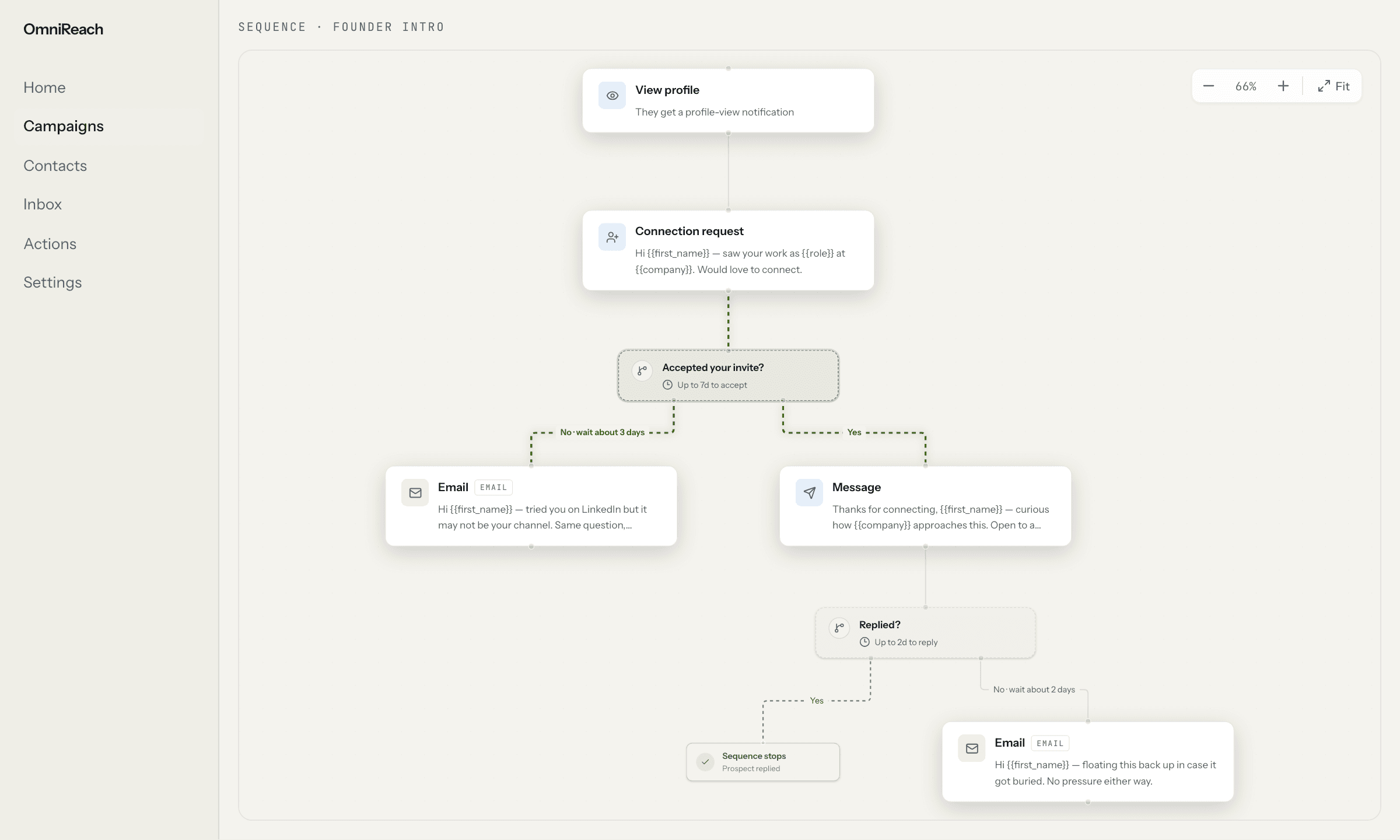
One path, with room for the prospect's response
The canvas shows acceptance-based branching, an email fallback, and a reply condition that ends the sequence.
Workflow
How it works in practice
- 01
Build the starting path
Arrange LinkedIn, email, InMail, and pre-invite steps around the outreach motion you want to run.
- 02
Add conditions and fallbacks
Branch after an invite outcome or use email and InMail fallbacks when the LinkedIn path is not the right fit.
- 03
Review before launch
Review the first touch before launch, then let reply-based stopping end the path when a conversation begins.
Best for
Multi-channel founder outreach
Start with a LinkedIn connection request and use an email fallback when an invite does not become a conversation.
Recruiting and network follow-up
Adapt the next step to an accepted invite, an available email address, or a reply instead of forcing one linear sequence.
Straight answers
Questions about sequences.
Can I build branching outreach sequences?
Yes. OmniReach sequences can branch around conditions such as an accepted invite, an available email address, or a reply.
How do email and InMail fallbacks work?
A sequence can use email or InMail as a fallback path when the LinkedIn route is not the right fit for that prospect.
Are first touches reviewed before a sequence launches?
Yes. OmniReach keeps the first-touch review before launch, so you can edit drafts, resolve flags, or skip prospects before sending begins.
What happens to a sequence after a reply?
When a prospect replies, the sequence stops so the next message comes from a person instead of another automated step.
Explore the other pieces: Signals · Personalization · Inbox